It is time to submit the Intrastat return, and the kilos that went to France or Germany are scattered across dispatches, invoices and the manager's Excel sheet. For Intrastat, the return is prepared with what you already have in the warehouse: dispatches that are closed, priced and invoiced, and every customer with the right country. Below you will find the steps in order, a table of checks to run before sending, the mistakes that force you to redo the return, and how the report comes out in Agrocom, from Infonet Consultores.
Submitting Intrastat: do you have to file?
The obligation to file Intrastat begins when you exceed €400,000 a year per flow, under Orden HFP/1480/2021 (the Spanish ministerial order that sets out the Intrastat statistical obligations). If your trading company sells fruit to customers in other European Union countries and passes that threshold, the return goes into the tax authority's calendar just like the quarter-end close.
The deadlines and the way to file are published by the Agencia Tributaria (the Spanish Tax Agency) on its page on the obligation to file the return and its deadlines. Bookmark it and check the dates before each season. If you are still unsure whether you are obliged to file, we explain it in detail in Intrastat: when a fruit trading company has to file, and what is known about a possible change to that threshold is in our post on the Agencia Tributaria's Intrastat threshold.
What to have ready before you sit down to do it
The return comes out right first time when the source data is clean. Before opening any report, go through this with the warehouse manager and whoever handles invoicing:
- Customers: every customer and each of their sites with their country and complete tax details. A French buyer registered with Spain as the country will drop out of the report without anyone noticing.
- Dispatches: all those in the period entered and closed, with net kilos, packages, packaging type and variety.
- Prices: no line left unpriced. If you sell part of the fruit with the price still to be settled, decide which amount you will use and make a note of it.
- Invoices: issued for all the dispatches in the period, including any credit notes needed for returns or quality refunds.
- Access: the person who files should be able to log in to the Agencia Tributaria's online portal from their own computer, without depending on someone else being in the office.
How to prepare your Intrastat return step by step
1. Close the period's dispatches
Start in the warehouse and then move to the office. Check with the loading bay supervisor that every lorry that left has its dispatch entered, with its CMR and destination customer. A load that left last Friday afternoon and was entered on Monday can end up in the wrong period.
2. Price each line
Each dispatch line needs a price and an amount. If in your warehouse part of the fruit is sold at a price to be fixed later, go over those lines before continuing and close them, or write down the criterion you apply so that every period is handled the same way.
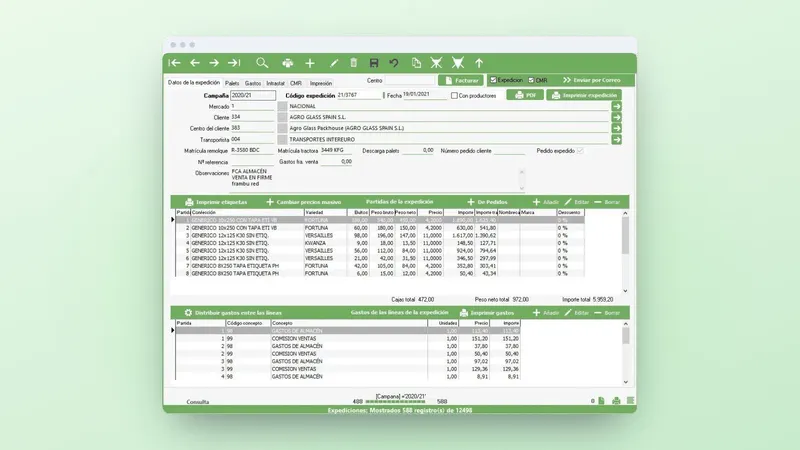
In an Agrocom dispatch, each line carries its packaging type, variety, packages, weights, price and amount, with warehouse costs and commission per line. That is exactly what must be complete before you file.
3. Separate the destinations
Keep only what went to other European Union countries. Sales to domestic customers are set aside, and anything going to the United Kingdom has its own paperwork, which we cover in Exporting fruit to the United Kingdom: paperwork and checks. Filtering by market or by the customer's country is the quickest way if the master data is right.
4. Reconcile with invoicing
Add up the kilos and amounts of the intra-EU dispatches in the period and compare them with what was invoiced to those same customers. If there is a difference, it is usually in one of three places: an invoice for a dispatch from the previous period, a credit note for a returned line, or a quality refund that was not carried over to the dispatch.
5. Run the report and review it
Generate the Intrastat report for the period and read it line by line before uploading anything. Take a close look at customers appearing for the first time, new countries and amounts that are out of line with what that customer invoices in any other period.
6. File it on the Agencia Tributaria website
The return is filed on the Agencia Tributaria website. When you finish, save the receipt together with the period's report, in the same folder as that month's close, so that your accountants or any review can find both together.
If every return forces you to add up the kilos from the dispatches by hand, in Agrocom the Intrastat report comes from the same dispatches and invoices, with the statistical value of the goods already calculated: ask for a no-obligation demo and see how it would work with your way of doing things.
What to check before sending
This table works as a checklist for the administration team. If a row fails, go back to the corresponding step before filing.
| What to check | Where to look | What happens if it fails |
|---|---|---|
| Country of each customer and site | Customer record and its sites | The sale does not appear in the report or appears with another country |
| Dispatches in the period | List of dispatches by date | Loads are missing or ones from the following period slip in |
| Price of each line | Dispatch lines | The declared amount does not match the invoices |
| Invoices and credit notes | List of invoices in the period | Differences between the return and the accounts |
| Net kilos | Dispatch weighing | Weights that mix fruit, packaging and pallet |
| Annual threshold | Total EU sales in the year | Filing without being obliged to, or failing to file when you are |
Mistakes that force you to redo the return
- Changing the date criterion: some periods by invoice date and others by the lorry's departure date. Choose the criterion your accountants advise, based on the Agencia Tributaria's information, and stick to it for the whole season.
- Mixing gross and net kilos from one dispatch to another, depending on who recorded the weighing.
- Duplicate customers: the same buyer registered twice, once with a country and once without.
- Returns and quality refunds that are invoiced but never reach the dispatch.
- Rebuilding the Excel sheet from scratch every period, copying and pasting rows from several lists. A single lost row is enough to force a correction.
- Confusing Intrastat with Soivre. Soivre is the commercial quality control on exports run by the Spanish Ministry of Economy, Trade and Business (Orden PRE/3026/2003, the Spanish order regulating it) and it is not filed with the Agencia Tributaria. We explain it in Soivre: the quality inspection for exporting fruit.
How it works in Agrocom
In Agrocom, Intrastat is prepared with the same data the warehouse uses. The dispatch records the destination customer, their site, the fruit dispatched, the brand, the packaging type, the kilos, the packages, the prices and the related growers. The invoice is generated from those dispatches with the invoicing wizard, so step 4 becomes a check rather than a search.
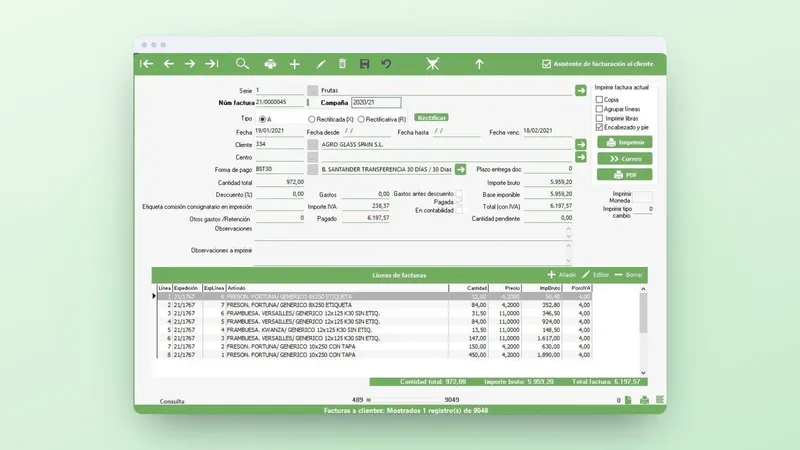
With that data, the Intrastat reports are ready to be filed on the Agencia Tributaria website, and Agrocom automatically calculates the statistical value of the goods. On the invoice you can see the series, the season, the payment method, the taxable bases, the VAT and the dispatch lines each amount comes from.
With per-user permissions, you can let whoever prepares the return view the dispatches without being able to modify them. And if you work with another program, for example a cooperative shared application, Agrocom has customer invoice exporters. You will find the details on the page about Intrastat in Agrocom, the one on automatic invoicing and the one on dispatches with their CMR transport document.
What to do before your next return
- This week, review the records of your EU customers: the country and tax details of each one and of all their sites.
- Agree with your accountants the date criterion and how you price lines without a settled price, and put it in writing for the whole team.
- On your next return, reconcile dispatches and invoices before running the report, with the table above in front of you.
If you would like to see how the Intrastat report comes out from your own dispatches, request information or a demo using the form, call +34 959 54 07 12 or message us on WhatsApp at +34 621 39 39 47.